
Getting an operating system onto a rented server sounds like a solved problem. Getting Talos Linux, an immutable, API-driven, SSH-less OS, onto bare metal that a cloud provider netboots however it likes, turned out to be a week of postmortems. We were building a bare-metal Kubernetes platform, and the install step alone went through five distinct approaches before a node reached Ready. Talos Linux itself is popular and stable: 10.7k GitHub stars, 330+ contributors, and a stable v1.13.x release line (siderolabs/talos, 2026). This is the honest version of what happened between “provision a server” and “join the cluster.”
Key takeaways
- Bare metal cuts 30-70% off the bill for stable, long-running Kubernetes workloads (OpenMetal, 2025), which is why immutable, no-SSH operating systems like Talos are worth the provisioning pain.
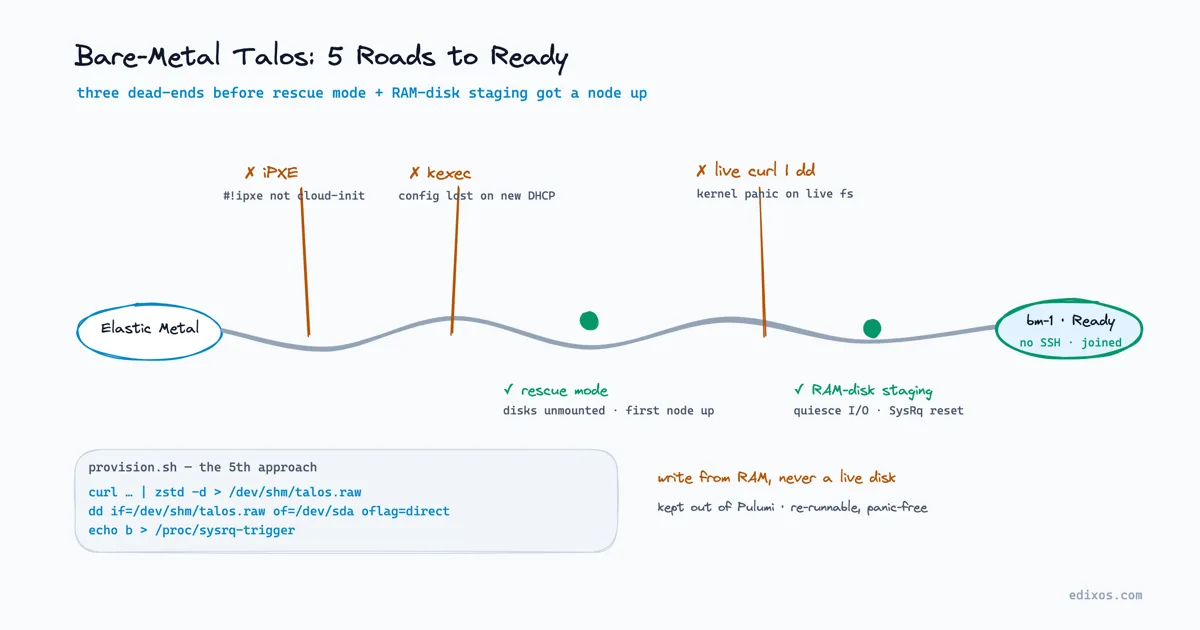
- Our install script went through iPXE, kexec, and live-disk
ddbefore rescue mode plus RAM-disk staging finally produced a reproducible, panic-free node.- Hardware-adjacent bring-up is imperative and messy: we deliberately pulled it out of Pulumi so a human could re-run it against a half-provisioned server.
- Every “obvious” fix surfaced a new failure: disk wipes broke the provider’s netboot, dual VLANs broke cluster join. Simplicity kept winning.
Why run Kubernetes on bare metal in 2026?
Bare metal wins on cost for stable, predictable workloads: OpenMetal (2025) reports 30-70% savings versus hyperscaler instances for long-running Kubernetes fleets, and cites 37signals saving $1.3M a year moving off AWS. For databases, CI runners, and always-on labs, dedicated hardware is simply cheaper than renting.
The same OpenMetal analysis cites roughly 50% workload-bill cuts in private-cloud migrations, and this is not an all-or-nothing bet. Around 70% of organisations now run hybrid infrastructure strategies, mixing cloud and dedicated hardware (Unihost, 2025). European teams reach for bare metal for data-sovereignty and predictable-cost reasons; North American teams increasingly lean on colocation to escape egress fees and instance markup. It is the same platform-engineering discipline that makes Kubernetes the right control plane on top: the workloads that belong on metal are the boring, steady ones — databases, CI runners, and lab environments that run all day, every day.
What makes Talos Linux different from a normal node?
Talos is a Kubernetes-only operating system with no shell, no SSH, and no package manager: you configure it entirely through a declarative API and a signed machine-config file. That immutability is the whole point. InfoQ (October 2025) frames it alongside Bottlerocket and Flatcar in the minimal-OS trend, and calls Talos the most opinionated.
It does one job — run Kubernetes — and strips everything else out. That design has real adopters. InfoQ names enterprises like SNCF and SGX, plus edge, retail, and factory-floor deployments where a locked-down, reproducible node matters more than operator convenience. Sidero markets Talos as going from “bare metal to Kubernetes in under a minute,” though that is a vendor claim measured under ideal conditions, not what you get on a first provisioning run against unfamiliar hardware.
The catch nobody warns you about: when the OS has no SSH and no rescue shell, every mistake during install is invisible until the node either joins or silently doesn’t. You debug by rebooting, not by logging in. That inverts how most of us learned to troubleshoot servers.
War story 1: Why iPXE plus cloud-init failed on day one
The first attempt died on a validation error, not a kernel panic. We tried the provider’s “Custom install” mode and passed an iPXE script through the CloudInit field. Scaleway validates that field as cloud-init YAML or a shell script, and an iPXE script starting with #!ipxe matches neither, so the API rejected it before a single byte booted.
The transferable lesson is dull but expensive: read what your provider’s boot fields actually accept before designing a flow around them. We had assumed “custom install” meant “arbitrary boot payload.” It meant “cloud-init, or a shell script, and nothing else.” An afternoon of iPXE templating went straight in the bin.
Gotcha: A cloud provider’s “custom” or “advanced” install mode is still fenced by input validation.
#!ipxeis not cloud-init YAML and not a shell script, so it fails schema checks before boot. Confirm the accepted format with a trivial payload first.
War story 2: The kexec dead end
The second approach looked elegant and led nowhere. We booted a normal Ubuntu image, then used a cloud-init script to kexec straight into a downloaded Talos kernel and initramfs, skipping a full reboot. kexec worked. Handing Talos its configuration afterward did not.
The problem is timing. After kexec, the machine grabs a fresh DHCP lease, and the short-lived HTTP server that was serving the machine config, running inside the now-replaced Ubuntu session, is gone. Talos comes up with no reachable config source. We tried embedding the config in the kernel command line instead and hit the provider’s cloud-init size limit. Without a persistent, reachable config host, there was no clean handoff, so we abandoned it mid-session, unresolved.
kexec is seductive because it feels faster and cleaner than a reboot. But it quietly destroys any in-memory state you were relying on, including the network identity and any local service. If your config-delivery mechanism lives in the OS you are replacing, kexec deletes your escape route at the exact moment you need it.
War story 3: How rescue mode got the first node to Ready
Rescue mode was the first thing that actually worked. We rebooted the Elastic Metal server into the provider’s RAM-resident rescue Linux (boot-type=rescue), SSHed in while the physical disks sat fully unmounted, wrote the Talos image directly to disk, then rebooted to normal boot. That got our first node, call it bm-1, to Ready.
Talos started cleanly from a disk that was never live-mounted during the write. The insight that unlocked it: the safe moment to write a raw OS image is when nothing is mounted from the target disk. Rescue mode gives you exactly that, a full Linux userland running entirely from RAM, with the real disks passive and writable.
# Reboot the metal server into the provider's RAM-resident rescue OS
scw baremetal server reboot "$SERVER_ID" boot-type=rescue

# ...once it is up, SSH in: physical disks are unmounted and safe to write...
curl -fsSL "$TALOS_IMAGE_URL" | zstd -d > /dev/shm/talos.raw
dd if=/dev/shm/talos.raw of=/dev/sda bs=4M oflag=direct status=progress

# Back to normal boot; Talos starts from a disk that was never live-mounted
scw baremetal server reboot "$SERVER_ID" boot-type=normal
War story 4: Chasing kernel panics into a RAM disk
Later we regressed, and the panics taught us why rescue mode mattered. To iterate faster, someone switched to installing Debian from the catalog, SSHing in, and running curl | dd of the Talos image straight onto the live disk. The result: random kernel panics, frozen SSH ports, and one server in a batch joining while an identical sibling failed.
There was no reproducible pattern, and that was the tell. Root cause, documented in a postmortem: writing raw disk blocks under a live filesystem, while other processes like curl and zstd still hold references to it, races the kernel into a panic. The fix arrived in layers. Stage the whole image into RAM (/dev/shm) first, quiesce background I/O, then dd from RAM to disk so the live filesystem is never read during the write. Replace the graceful reboot with a SysRq hard reset, because rebooting a filesystem mid-flux can itself panic.
curl -fsSL "$TALOS_IMAGE_URL" | zstd -d > /dev/shm/talos.raw
swapoff -a
echo 3 > /proc/sys/vm/drop_caches
dd if=/dev/shm/talos.raw of=/dev/sda bs=4M oflag=direct status=progress
echo b > /proc/sysrq-trigger || true   # SysRq reset; || true absorbs the dropped SSH
The signature was the non-determinism: identical hardware, identical script, different outcomes. “Works on one, panics on the next” almost always points at a race, not a config bug — the same class of non-deterministic failure we have learned to hunt in Kubernetes controller reliability. We stopped hunting for the “bad server” once we accepted that.
War story 5: The disk-wipe saga, RAID, iPXE, and a blank GPT
The second disk cost us three false starts, each fix exposing an unrelated failure. Attempt one: zero-wipe the secondary disk so Longhorn could claim it. That crashed the provider’s iPXE bootloader with an I/O error, because its boot firmware wants a valid bootloader signature on every physical disk.
Attempt two: write Talos to both disks. That killed the iPXE crash but caused a GPT label collision, duplicate TALOS-STATE and TALOS-EPHEMERAL partitions, which crashed kubelet. The fix that held: Talos on the primary disk only, and the secondary gets wipefs -a, a small zero-wipe, and a blank GPT with a protective MBR. That signature satisfies the firmware’s boot scan while leaving the disk empty for Talos to format natively for Longhorn. One more wrinkle: the provider ships servers with a software RAID 1 spanning both disks, holding the secondary with an exclusive lock, so the script has to fail and remove those array members before it can wipe anything.
# Release the secondary disk from the provider's default software RAID 1
for part in $(lsblk -nlo NAME /dev/sdb | tail -n +2); do
  mdadm --fail /dev/md0 "/dev/$part"  2>/dev/null || true
  mdadm --remove /dev/md0 "/dev/$part" 2>/dev/null || true
done

# A blank GPT + protective MBR: enough of a signature to keep iPXE booting,
# empty enough for Talos to format the disk for Longhorn
wipefs -a /dev/sdb
dd if=/dev/zero of=/dev/sdb bs=1M count=10
parted -s /dev/sdb mklabel gpt
Gotcha: Some providers’ netboot firmware refuses to iPXE-boot a server if any attached disk lacks a valid bootloader signature. An “empty” disk is not neutral; it can break booting entirely. A blank GPT with a protective MBR is the minimum that keeps the firmware happy.
What did the Pulumi bootstrap layer teach us?
Everything above sits deliberately outside Pulumi. Pulumi owns the convergent, declarative layer — the VPC, private network, NAT gateway, Talos VMs, and the cluster bootstrap with Cilium as CNI. A fragile, hardware-dependent install sequence is imperative and needs tight debug loops, so we scripted it instead of forcing it through pulumi up.
That declarative layer was verified end to end — a LoadBalancer got a real external IP, a PVC bound and a pod wrote to it — and it still had its own gotchas. The Pulumi state bucket had object versioning on by default, so dev.json quietly accumulated over 10,000 versions until the object store refused further writes; a lifecycle rule fixed it. Cloud-managed Kubernetes resources needed RetainOnDelete so an interrupted teardown didn’t wedge a Helm release. The cloud controller manager’s providerID assignment silently fails without cloud-provider: external, but adding that flag before the CCM exists taints every node and blocks the CNI, so sequencing matters.
Gotcha: The Scaleway cloud controller manager has no
--cluster-idflag despite looking like standardcloud-controller-managersurface.HasClusterID()is hardcodedfalse, so--allow-untagged-cloudis mandatory or the CCM fatals on startup. Cluster naming goes through theSCW_CCM_PREFIXenv var instead.
When was network isolation too clever?
We designed a clean two-network split, a platform private network for the control plane and infra workers, and a separate isolated network for untrusted lab worker nodes, and then we deleted it. Attaching a bare-metal server to both private networks introduced a VLAN-matching bug in the Talos machine-config generation. The node never joined the cluster.
The fix was subtraction. We removed the second subnet entirely and put the bare-metal worker on the same platform network as everything else, eliminating dual-VLAN handling. As-built, there is no network-layer isolation between node types; if lab workloads need isolation, it lives at the Kubernetes layer instead. In our experience, an elegant topology that blocks nodes from joining is worth less than a flat one that works. Simplicity won, again.
What do these war stories teach about immutable infrastructure?
Immutable infrastructure moves the hard part to provisioning. When a node can’t be patched, SSHed into, or hand-fixed, every ounce of complexity gets pushed into the moment you build it, and that moment has to be reproducible or nothing is. That is why we chased panics into a RAM disk and codified a blank-GPT trick.
We did that not for elegance, but so the hundredth node comes up exactly like the first. The recurring pattern across all seven stories is that each confident fix exposed an unrelated failure. iPXE validation, then kexec’s lost config, then live-disk panics, then the firmware’s disk-signature demand, then a VLAN join bug. Hardware-adjacent bring-up rewards empirical, postmortem-driven iteration over getting it right in one pass. Write the script to be idempotent, re-runnable against a half-broken node, and honest about what it assumes. The immutability you get at runtime is paid for entirely up front.
Conclusion
Bare-metal Kubernetes with Talos is a genuinely good trade for the right workloads: real cost savings, data sovereignty, and a locked-down, reproducible OS that does exactly one job. But the marketing line about “under a minute” describes the happy path, not the first week of provisioning against unfamiliar hardware.
The honest path runs through rejected iPXE scripts, a kexec dead end, kernel panics, a three-round disk-wipe fight, and a VLAN bug that got solved by deleting the network. If you take one thing from these war stories, take this: immutable infrastructure does not remove operational pain, it relocates it to provisioning, where it belongs. Invest in an idempotent, re-runnable install path, document your failures as postmortems, and prefer the flat, boring topology that works over the clever one that doesn’t.
Ismail Kaboubi leads cloud and platform engineering at Edixos.
Straight answers
Frequently asked questions
Is Talos Linux production-ready for bare metal?
Yes. Talos has a stable v1.13.x line, 10.7k GitHub stars, and 330+ contributors (siderolabs/talos, 2026), with enterprise adopters including SNCF and SGX cited by InfoQ (October 2025). The provisioning path is fiddly, but the running OS is stable and widely deployed in edge and factory settings.
Why not just SSH in and install Talos the normal way?
Because Talos has no SSH and no shell by design. You configure it through a declarative machine-config API, not an interactive session. That immutability is the security and reproducibility feature, but it means all your debugging happens during provisioning, through reboots and logs, rather than by logging into a running node.
Does bare metal actually save money versus cloud?
For stable, long-running workloads, yes. OpenMetal (2025) reports 30-70% savings and cites 37signals saving $1.3M a year moving off AWS. The savings shrink or reverse for spiky, unpredictable workloads where you would otherwise scale to zero. Around 70% of organisations run hybrid strategies (Unihost, 2025) for this reason.
Should Talos install live inside my IaC tool or in a separate script?
In our experience, keep it separate. Declarative tools like Pulumi excel at convergent infrastructure, but a fragile, multi-phase, hardware-dependent install needs imperative, re-runnable scripting with tight debug loops. We let Pulumi own the cluster and VPC, and drove bare-metal install and join from a standalone idempotent script.